Lookalike audiences for customer acquisition
Create and optimize lookalike audiences using first-party data to reduce CAC, increase ROAS, and centralize management on Meta and Google.
Lookalike audiences (lookalike audiences) are a powerful tool for e‑commerce merchants seeking to increase their conversions while reducing their advertising costs. These audiences allow you to target users who share the same characteristics as your existing customers, thereby maximizing your chances of conversion. Here are the key points to remember:
- Definition : A lookalike audience is generated by advertising platforms (Meta, Google Ads) from a source audience, such as your loyal customers or subscribers.
- Benefits : They increase conversions (+41 % according to Google Ads) while reducing cost per acquisition (CAC).
- Requirements : A quality source audience is key (engaged customers, reliable first-party data).
- Tools : Solutions like Feedcast centralize and simplify multi-platform audience management.
Lookalike audiences are particularly effective for expanding your advertising reach while maintaining a good return on ad spend (ROAS), especially when combined with automation and advanced segmentation tools.
::: @figure 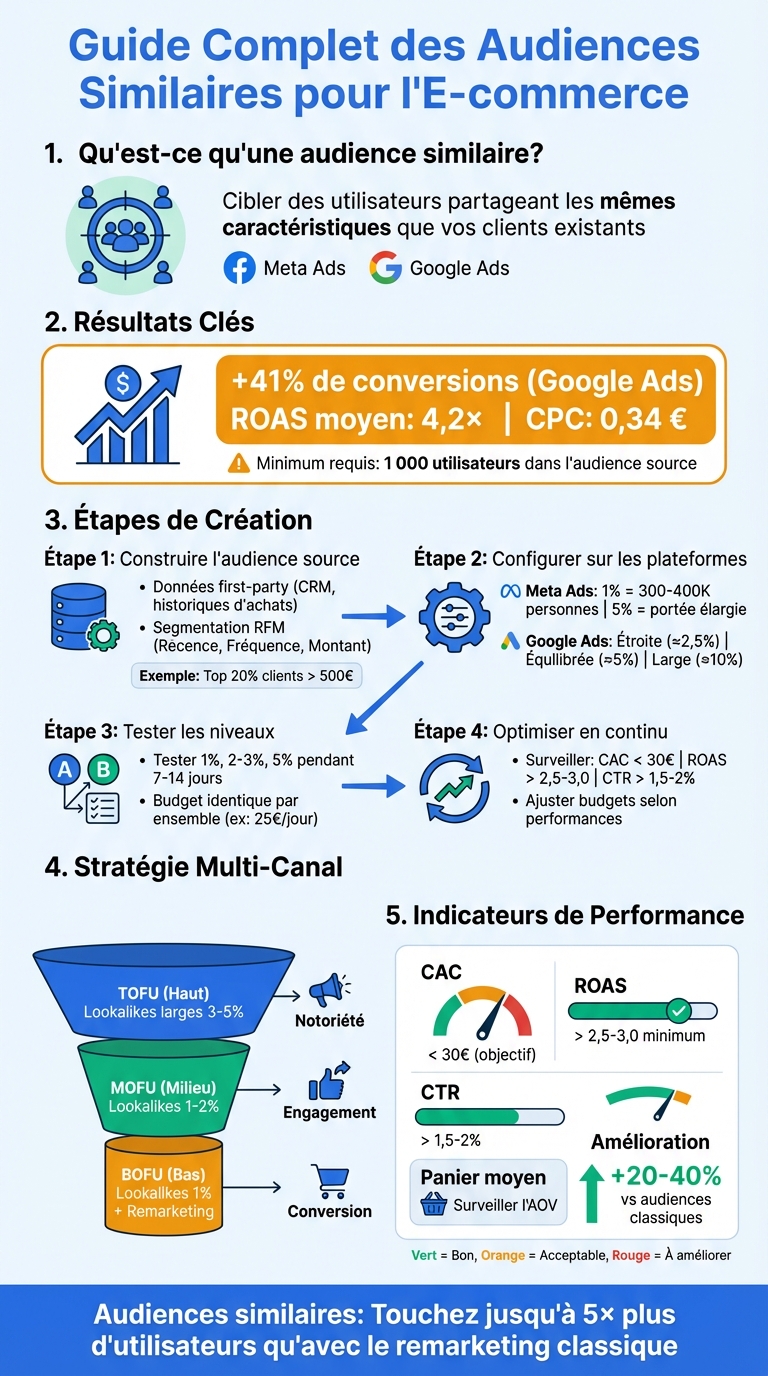 {Complete guide: create and optimize lookalike audiences for e-commerce}
Meta Business Manager : Create a lookalike audience / lookalike | Marie Galliez Communication ✨
Building high-quality source audiences
The quality of your lookalike audience depends entirely on that of your source audience. If you provide Meta or Google with a list of inactive or overly diverse customers, the algorithm will generate similarly irrelevant profiles. Conversely, a well-defined source audience composed of your most engaged customers will reach genuinely qualified prospects. According to Google Ads, lookalike audiences can reach up to five times more users than a simple remarketing list while maintaining high relevance[4]. Let’s see how to leverage your first-party data to optimize your source audiences.
Using first-party data for your source audiences
First-party data is information you collect directly, such as CRM data, purchase histories, or events tracked on your site (for example, “Add to cart”, “Purchase”, “Initiate checkout”). This data reflects real and reliable behaviors. To ensure quality source audiences, it is essential to optimize tracking of these key events. For example, create a list of customers who made repeat purchases and import it via Meta’s Events Manager or Google’s Customer Match. Note that most platforms require a minimum of 1 000 users to generate an effective lookalike audience[1][3].
Segmentation strategies for source audiences
Segmentation is a crucial step to refine your source audiences. The RFM model (Recency, Frequency, Monetary) is particularly useful: identify customers who purchased recently, frequently, and with a high average basket value (for example, the top 20 % of customers spending more than 500 €). Another approach: segment by product category. For instance, create a source audience made only of buyers of “luxury bags” to target prospects interested in that type of premium product[2][3]. When combined with Display campaigns, Google Ads reports you could achieve up to 41 % more conversions[4]. These well-defined segments are essential to maximize the effectiveness of your advertising campaigns.
How Feedcast simplifies creating source audiences
Feedcast.ai helps you import and enrich your product and customer data from Shopify, WooCommerce, Prestashop or via CSV, XML and Google Sheets files. Thanks to its artificial intelligence, Feedcast automatically enriches your product data and corrects feed errors, ensuring higher-quality information. These enriched data allow you to create precise segments (such as high-value categories) that you can then export to Meta or Google to build high-performing source audiences. Additionally, Feedcast’s unified dashboard gives you a real-time view of key metrics (ROAS, CPC, spend), making it easier to optimize your campaigns across multiple platforms without switching between different interfaces.
Create lookalike audiences on advertising platforms
Turn your source audiences into lookalike audiences directly on each advertising platform. The principle is simple: the algorithm analyzes your source audience to identify users with similar behavioral and demographic characteristics. Here’s how to configure these audiences for the French market.
Configure lookalike audiences on Meta Ads
On Meta Ads, go to the Audience Manager, click “Create Audience”, then select “Lookalike Audience”. Choose a source audience, such as “Customers who spent > 200 €”, and set France as the geographic area. Then adjust the slider between 1 % and 10 %:
- 1 % targets about 300,000 to 400,000 people, very close to your source audience.
- 5 % widens reach, but with lower precision [5][6].
To maximize advertising return on ad spend (ROAS), start with a 1 % size, then test sizes of 2–3 % and 4–5 % in separate ad sets to compare results. Consider excluding your current customers using a custom audience to focus solely on acquisition. Finally, choose automatic placements and set a conversion or value objective, allowing Meta to optimize delivery [5][6].
Use similar segments on Google Ads
On Google Ads, similar segments are automatically generated from your remarketing lists (for example, site visitors, buyers, cart abandoners) and data from Google Analytics 4. Once your source lists reach at least 1,000 active users, Google creates these segments in the Audiences section. To use them:
- Open a Display, YouTube, Discovery or Shopping campaign.
- Go to Audiences, click “Browse” → “How they interacted with your business”.
- Select the corresponding similar segment, like “Similar to All visitors – 30 days”.
Google offers different similarity levels: narrow (≈2.5 %), balanced (≈5 %) and broad (≈10 %). Narrow segments are more qualified for conversions. Add these segments in Observation mode with bid adjustments on Search/Shopping to test their impact, or in Targeting mode on Display/YouTube for more precise prospecting. Pair them with smart bidding strategies, like Target CPA or Target ROAS, to make the most of audience signals. According to Google, this method can increase Display conversions by up to 41 % [4].
Manage audiences across platforms with Feedcast
Feedcast simplifies cross-platform management of your audiences. By connecting your ad accounts and your e-commerce (Shopify, WooCommerce, PrestaShop), Feedcast automatically generates high-quality source segments, such as “Top 10 % customers by revenue”, “30-day cart abandoners” or “Recent buyers”, and syncs them to Meta, Google and Microsoft Ads.
No more manual exports and duplicates: Feedcast keeps your audiences up to date and consistent across platforms. You can track performance in real time (ROAS, CPA, conversion rate), compare results across ad networks, and adjust budgets and similarity levels directly via the interface. This centralized management saves you time while optimizing your acquisition campaigns.
Optimize and test lookalike audiences
Test similarity levels and source segments
To refine your campaigns, experiment with different similarity levels within your audiences. On Meta, create three ad sets targeting 1 %, 2–3 % and 5 % of the French population respectively. On Google Ads, duplicate your ad groups and apply the similar segments narrow (≈2,5 %), balanced (≈5 %) and broad (≈10 %), while keeping other settings constant. Allocate an identical daily budget (for example, 25,00 € per set) and let the campaigns run for 7 to 14 days to collect reliable data.
In parallel, test several source segments such as the top 20 % of your customers, recent buyers, or cart abandoners. These tests will help you identify which one generates the best ROAS (Return on Ad Spend). Generally, audiences based on high-value customers deliver better results because they allow the algorithm to target more qualified profiles. These initial experiments are essential to assess the effectiveness of your audiences.
Key metrics to monitor
To evaluate your lookalike audiences, focus on four major financial metrics:
- Customer acquisition cost (CAC): Divide your ad spend by the number of new customers. CAC should remain below your break-even threshold, for example less than 30,00 €.
- ROAS: Calculate it by dividing your revenue by your ad spend. A ROAS of at least 2,5–3,0 is generally required to cover your fixed costs and margins.
- Click-through rate (CTR): A CTR higher than 1,5–2 % on Meta or Google Display indicates a good level of engagement and ad relevance.
- Average order value (AOV): For example, an audience based on your big spenders may produce a CAC of 35,00 €, but if it generates an AOV of 70,00 € instead of 50,00 €, your ROAS remains stable.
Set up automation rules to adjust your budgets. If your CAC exceeds the target by 20 % over 7 days with at least 20 conversions, reduce the budget by 30–50 %. Conversely, if your ROAS reaches 3,5 with at least 20 weekly conversions, increase the budget by 20–30 % every 3–4 days. These regular adjustments will help you optimize performance.
Use Feedcast for continuous optimization
Feedcast simplifies campaign management by centralizing Meta, Google and Microsoft Ads performance data in a single dashboard. There you’ll find metrics like CAC, ROAS, CTR and AOV, sorted by audience and by channel. Configure automatic alerts to be notified as soon as an audience exceeds a CAC threshold (for example, > 30,00 €) or falls below a target ROAS (< 2,0). This saves you time from manually exporting data from each platform.
Feedcast’s AI analyzes your performance continuously and automatically reallocates budgets toward the most profitable audiences. For example, if your Lookalike 1 % based on high-value customers reaches a ROAS of 4,0 with a CAC of 18,00 €, while a 5 % audience caps at a ROAS of 2,2, Feedcast redirects budget to the best-performing audience.
Feedcast also identifies high-value audience segments (like customers with an order above 80,00 €) by analyzing your e-commerce data from Shopify, WooCommerce or PrestaShop. These segments are then automatically synced as source audiences across all your ad platforms. This centralized management saves you time while increasing profitability, with users reporting an average ROAS of 4,2× and a CPC of 0,34 €.
Advanced strategies and multi-channel approaches
Value-based lookalike audiences and high-LTV customers
Once your source audiences are optimized, it’s time to leverage your best customers to create highly performing lookalike audiences. Rather than using all buyers, focus on the 10 to 20 % of customers who generate the majority of your revenue or margins. To do this, analyze criteria like total amount spent, purchase frequency and recency (RFM segmentation). For example, target customers who spent more than 250,00 € in the last 12 months and exclude one-off buyers.
On Meta Ads, upload a customer list including a column showing the total value spent per customer (in €). Choose the "Value-based lookalike audience" option and opt for a size of 1 to 2 % to maximize similarity. On Google Ads, use Customer Match with columns for transactional value or LTV, then let similar segments find high-value users. Admittedly, CAC may increase slightly (by 10 to 30 %), but ROAS and AOV often improve noticeably, as platforms target profiles similar to your best customers. With Feedcast, you can centralize these segments by connecting your e-commerce platform (Shopify, WooCommerce, PrestaShop) and automatically sync your “best customers” as a source audience on Meta, Google and Microsoft.
Multi-stage funnels with lookalike audiences
To maximize acquisition efforts, structure your strategy into three clear stages.
- Top of funnel (TOFU): Launch awareness campaigns on Meta and Google Display/YouTube using broad lookalikes (3 to 5 %) based on your recent buyers. Use short video formats and messages focused on brand discovery.
- Middle of funnel (MOFU): Target visitors who interacted with your products, added to cart, or watched your videos using tighter lookalikes (1 to 2 %) created from engaged audiences. Highlight elements like customer reviews, social proof, or demos.
- Bottom of funnel (BOFU): Focus on dynamic remarketing for cart abandoners and returning visitors. Complement this approach with 1 % lookalikes of your recent buyers and offer strong incentives, such as free shipping within metropolitan France or exclusive promo codes.
Feedcast simplifies managing these stages by automatically syncing your source segments (for example, “add to cart last 7 days” or “buyers 90 days”) across all your ad platforms. By adjusting lookalike granularity and budget allocation according to your LTV and CAC data, you can effectively coordinate campaigns at each funnel stage.
Cross-channel coordination with Feedcast
To avoid overlap between channels and optimize your strategy, standardize your key segments (like “Clients VIP France”, “Buyers 12 months”, or “Cart abandoners 7 days”). Then sync them across Meta, Google and Microsoft via Feedcast. Each channel can thus play a specific role: Meta for discovery and video formats with broad lookalikes, and Google Shopping or Microsoft to target high-intent queries using similar audiences that optimize bids.
Thanks to its unified dashboard, Feedcast lets you monitor audience performance in real time and identify potential overlaps. This centralization ensures consistency and optimization across all channels, contributing to a clear improvement in your overall ROAS.
Conclusion
Key points for succeeding in e-commerce
Similar audiences are a powerful lever for customer acquisition, but their effectiveness depends on solid foundations. The quality of the source audiences is paramount. Always prioritize your first-party data from your most valuable customers, such as those who make recurring purchases or whose cart exceeds 250,00 €, rather than relying on generic segments.
On the technical side, it is essential to adapt your strategy to each platform. For example, on Meta, start by targeting narrow audiences, then progressively broaden to increase awareness. On Google Ads, leverage similar segments built from your remarketing lists and behavioral signals to optimize your bids, notably for Search and Shopping campaigns.
Continuous optimization is the key to success. Test different similarity levels and adjust your campaigns based on your key indicators: a ROAS above 4,0x, a CPA below 25,00 €, and a conversion rate beyond 2,5 %. In general, similar audiences outperform standard audiences by 20 to 40 % in terms of conversions.
Finally, these preliminary steps show how optimization, notably through tools like Feedcast, can further strengthen your advertising performance.
How Feedcast simplifies acquisition via similar audiences
Feedcast revolutionizes the management of similar audiences thanks to its AI-based data enrichment system and its automatic sync with Meta, Google and Microsoft. By connecting directly to your online store, whether it’s on Shopify, WooCommerce or PrestaShop, you can create high-quality source segments, such as « Clients VIP France » or « Acheteurs 90 jours ». These segments are instantly synced across all your advertising platforms, halving the time required for setup.
The Feedcast dashboard lets you precisely track the performance of your similar audiences, expressed in euros. With an average ROAS of 4,2x and total spending reaching 135 000,00 €, it quickly identifies opportunities for improvement. In addition, Feedcast’s AI automatically generates ads tailored to each channel, adjusts your bids in real time and sharpens your targeting to maximize your advertising return on investment.
Feedcast offers a free plan to get started and benefits from the status of a Google CSS certified partner, offering an automatic 20 % reduction on Google Shopping CPC bids. This solution allows French e-merchants, regardless of their size, to implement effective similar audience strategies without technical complexity, while complying with GDPR requirements and local specificities.
By combining these best practices with centralized management, you ensure a smooth and high-performing acquisition strategy while maximizing your results.
FAQs
How do I create a quality source audience for effective similar audiences?
To get the most out of your similar audiences, everything starts with a high-quality source audience. This should include users who have already actively engaged with your brand, whether they are customers who made a purchase, loyal subscribers, or users who have shown marked interest in your products or services.
Take the time to segment your source audience carefully. It should accurately represent your ideal customer. Remove unnecessary or unreliable data that could skew your results. Then, regularly analyze your advertising campaign performance. This will allow you to readjust your criteria and continuously refine your targeting.
Finally, by integrating advanced optimization tools, you can further fine-tune your strategy. These technologies will help you achieve more precise results and maximize the impact of your campaigns.
How do I effectively test and optimize similar audiences to maximize customer acquisition?
Testing and optimizing your similar audiences starts with setting up A/B test campaigns. This process helps you compare different audience sizes or similarity levels to identify those that deliver the best results. Take the time to regularly analyze performance data, such as click-through rates (CTR) or conversions, to adjust your targeting parameters accordingly.
Using automation- and AI-based tools can greatly simplify this task. These technologies enable continuous refinement of targeting, making your similar audiences even more relevant. The goal? Reach ideal customers at the moments when they are most receptive.
How does Feedcast help manage and optimize similar audiences to acquire new customers?
Feedcast offers a convenient solution to manage similar audiences by automating their creation and optimization across different advertising platforms. By using your existing data, this method enables you to reach new customers in a targeted way and improve the overall performance of your campaigns.
With a centralized interface, you can monitor all your campaigns, analyze results in real time and adapt your strategies based on the most relevant audiences. This greatly simplifies management while increasing the efficiency and return of your advertising investments.
Geoffrey G.